一、前言
养了三个星期的龙虾,由于可以在手机上就能指挥它干活,相比电脑上用ClaudeCode/OpenCode或者其它IDE带来了很大的便利,但是带来便利的同时就是这家伙的胃口太好,太吃token了。
前天3月18日,阿里云与百度智能云同一天宣布涨价。阿里云涨幅最高达34%;百度智能云则上调约5%—30%,并行文件存储等价格上调约30%。两家云厂商均将涨价归因于“全球AI需求爆发”。
腾讯云一周前已宣布上调两款自研模型Tencent HY2.0 Instruct和Tencent HY2.0 Think的价格,上涨463%。同时,腾讯云结束对GLM 5、MiniMax 2.5、Kimi 2.5 三款模型的免费公测,转为正式商用服务。
1、阿里云百炼
阿里云百炼 Coding plan套餐:https://bailian.console.aliyun.com/cn-beijing
前两天还有7.9元和39.9元的coding plan套餐,当时只是没抢到。
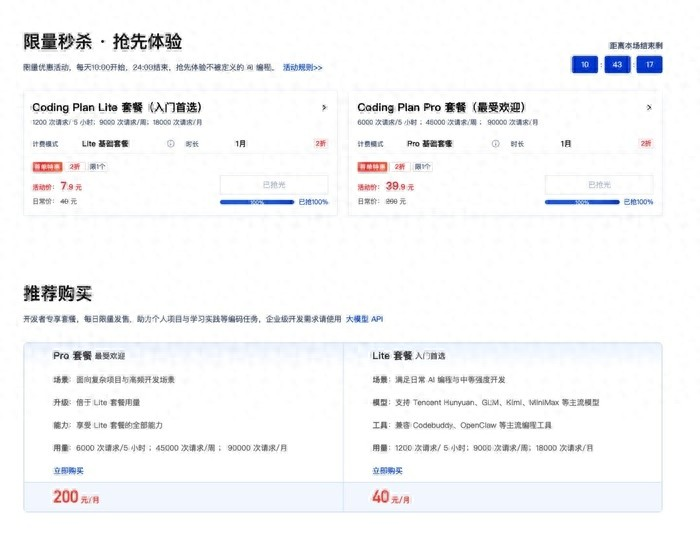
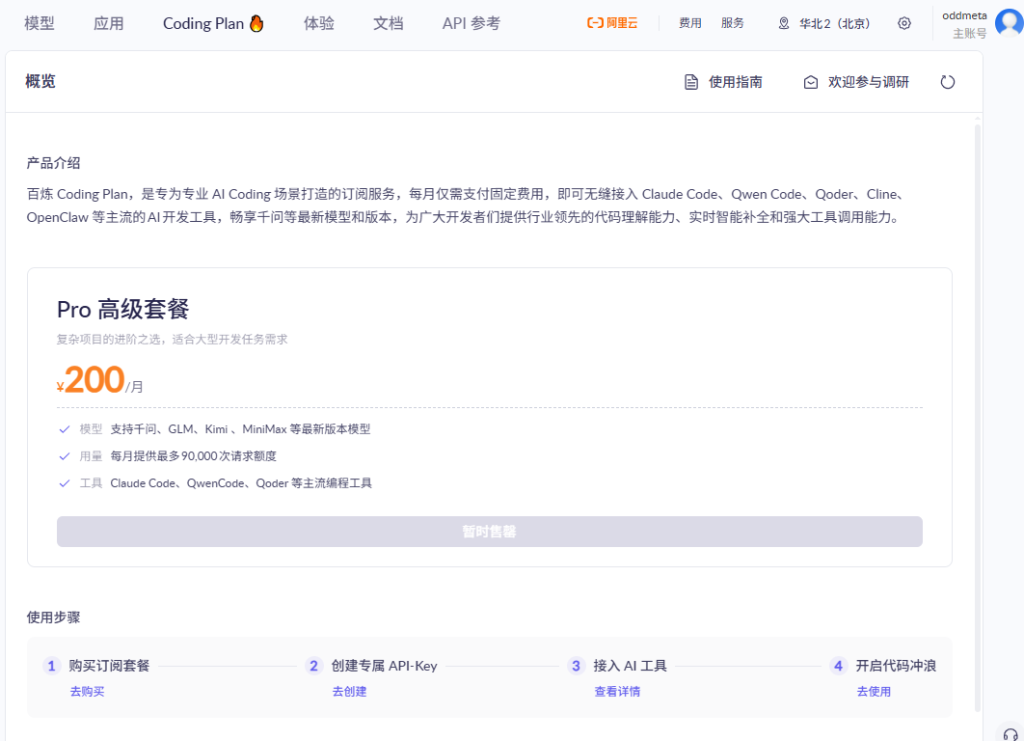
现在你再打开阿里云百炼的 Coding plan,会发现原先的7.9元和39.9元的两个套餐已经没有了,只剩下那个200元的套餐了。
2、百度云
百度千帆 Coding plan套餐:https://console.bce.baidu.com/qianfan/resource/subscribe
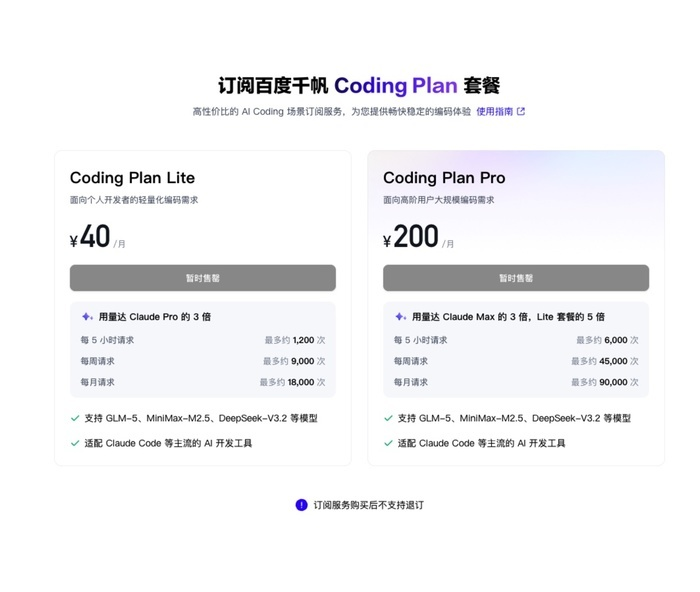
同阿里云百炼,40元的套餐已经买不到,只有200元的套餐还可以买。
二、寻找各种可白嫖的API Token方案
网上一搜免费API,你会发现:卧草,各种可以白嫖的API,什么Googe Gemini,OpenRouter, Nvidia的,但是我试了一下,在国内Gemini和Nvidia都无法使用,创建了API后,直接报401。
OpenRouter的可以用,但是额度太少,像我的小落同学的使用场景,三两下就把额度花完了。
最后找到OpenCode Zen的方案,目前是给小落同学还有我本机的OpenClaw给配置上去了。
三、如何白嫖OpenCode Zen的API token
步骤很简单:注册账号,复制自动创建的API Key,选择免费模型并测试,配置到你的OpenClaw。
1. 注册并登录OpenCode账号
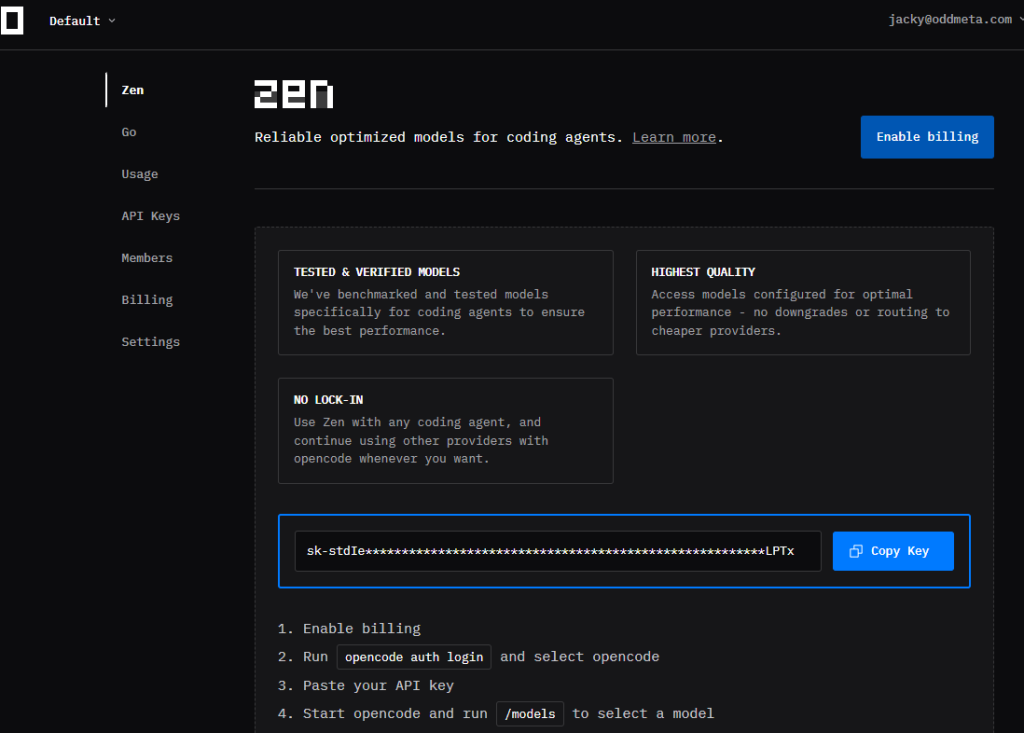
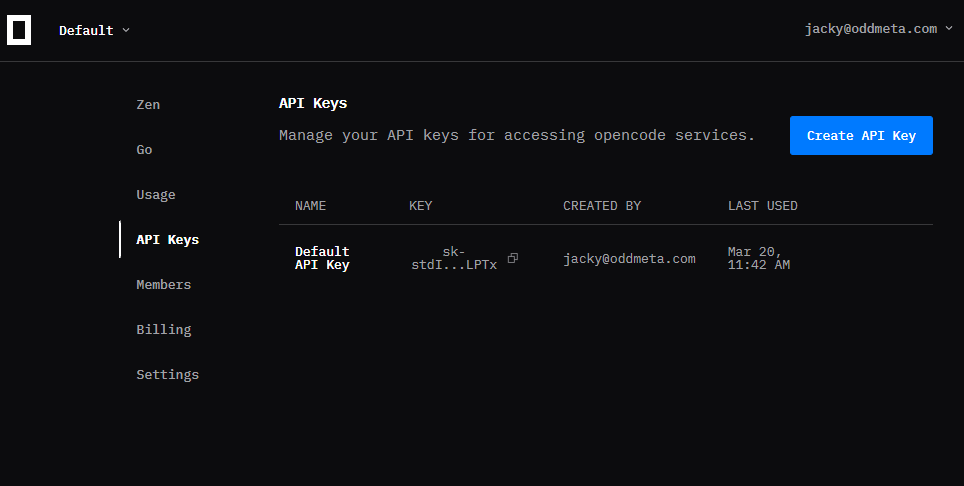
登录你的OpenCode账号(如果还没有的话,那就注册一个),然后点击上面菜单项中的 Zen,或者直接打开链接:https://opencode.ai/zen ,Get Started With Zen, 进入你的workspace,这个时候opencode就已经给你自动创建了一个api key。如:
2. 记录并测试api key
OpenCode Zen的API地址是:https://opencode.ai/zen/v1
目前有提供许多个免费模型,当前每日token数最大的是 mimo-v2-pro-free 和 nemotron-3-super-free,限量都是100万,其它一些免费模型则在20万、40万左右。
拿到了API Key后,你可以先自己写个简单的脚本测试一下,看看是否一切正常。如果正常,再将之配置到OpenClaw。
测试脚本 test.py 如下:
from openai import OpenAI

# OpenAI SDK : pip install openai

GPT_URL="https://opencode.ai/zen/v1"
GPT_MODEL="minimax-m2.5-free"
GPT_MODEL="mimo-v2-pro-free"
GPT_MODEL="nemotron-3-super-free"
GPT_API_KEY="sk-st***************"

client = OpenAI(base_url=GPT_URL, api_key=GPT_API_KEY)

def test():
    response = client.chat.completions.create(
        model=GPT_MODEL,
        messages=[
            {
                "role": "user",
                "content": "hi"
            },
            {
                "role": "assistant",
                "content": "Hi there! 😊 How can I help you today? Whether you have a question, need assistance, or just want to chat, I'm here for you!"
            }
        ],
        temperature=0.8,
        top_p=0.8,
        extra_body={
            "penalty_score":1,
            "stop":[],
            "web_search":{
                "enable": False,
                "enable_trace": False
            }
        }
    )
    print(response)


if __name__ == '__main__':
    test()
测试运行:
python test.py运行后只要没报错说明就能用。
3. OpenCode Zen支持的免费模型列表
这个目前(今天 2026年3月20日)上面免费的模型有这么一些,如果某一个模型用量耗尽了,可以切换到其他的。
{
    "object": "list",
    "data": [
        {
            "id": "minimax-m2.5-free",
            "object": "model",
            "created": 1773977129,
            "owned_by": "opencode"
        },
        {
            "id": "mimo-v2-pro-free",
            "object": "model",
            "created": 1773977129,
            "owned_by": "opencode"
        },
        {
            "id": "mimo-v2-omni-free",
            "object": "model",
            "created": 1773977129,
            "owned_by": "opencode"
        },
        {
            "id": "mimo-v2-flash-free",
            "object": "model",
            "created": 1773977129,
            "owned_by": "opencode"
        },
        {
            "id": "trinity-large-preview-free",
            "object": "model",
            "created": 1773977129,
            "owned_by": "opencode"
        },
        {
            "id": "big-pickle",
            "object": "model",
            "created": 1773977129,
            "owned_by": "opencode"
        },
        {
            "id": "nemotron-3-super-free",
            "object": "model",
            "created": 1773977129,
            "owned_by": "opencode"
        }
    ]
}
四、将大模型配置到openclaw
OpenClaw的模型配置步骤如下:
1. 启动配置向导
在命令行中用启动配置向导:
openclaw config2. 配置OpenCode Zen API
 Where will the Gateway run?
|  Local (this machine)
|
o  Select sections to configure
|  Model
|
o  Model/auth provider
|  Custom Provider
|
o  API Base URL
|  https://opencode.ai/zen/v1
|
o  How do you want to provide this API key?
|  Paste API key now
|
o  API Key (leave blank if not required)
|  sk-*************************************
|
o  Endpoint compatibility
|  OpenAI-compatible
|
o  Model ID
|  nemotron-3-super-free
|
o  Verification successful.
|
o  Endpoint ID
|  custom-opencode-zen
|
o  Model alias (optional)
|  opencode-zen
Configured custom provider: custom-opencode-zen/nemotron-3-super-free
Config overwrite: C:\Users\Administrator\.openclaw\openclaw.json (sha256 a51c67180da07bd08e3e2a8e800a4d83d66a635081408df9140d20ba579a9b15 -> 6cb0e29772767183b0fab47cd0147020b1593fbeae2fb4627fedd671a1610ab5, backup=C:\Users\Administrator\.openclaw\openclaw.json.bak)
Updated ~\.openclaw\openclaw.json
最后选择Continue,退出向导。
3. 配置好的openclaw.json
对应的openclaw.json中的配置如下:
{
    "models":
    {
        "providers":
        {
            "minimax":
            {
                "baseUrl": "https://opencode.ai/zen/v1",
                "apiKey": "api key",
                "api": "openai-compatible",
                "models": [
                    {
                        "id": "nemotron-3-super-free",
                        "name": "nemotron-3-super-free",
                    }
                ]
            }
        }
    }
}
4. 刷新openclaw控制台,测试新模型
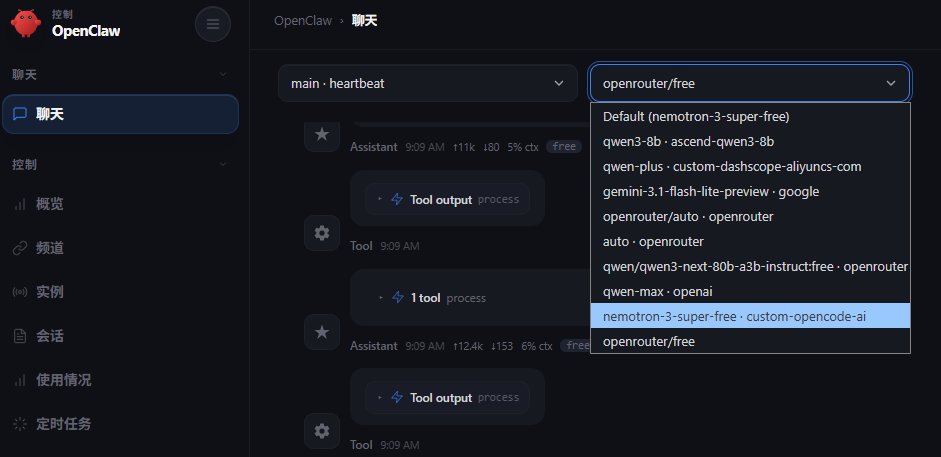
刷新一下你的openclaw: http://127.0.0.1:18789/
在上面你就能看到新加进去的这个模型,并用这个模型来跟openclaw对话了。
五、省token小技巧
如果是普通的对话,大概 20 轮对话消耗 1M,而如果是写代码可能三五轮对话就会消耗掉1M。
因此,如果你在对话的时候,如果是两个不相关的话题的话,一定要先输入 /new 开启会话,这样能够省不少的 tokens。